 CS:GO
How to Play CS:GO in 2026 (Download and Find Servers)
CS:GO is back on Steam as a free standalone game. How to install it with App ID 4465480, find community servers that still have players, and connect.
 By StefaK
Written forCS:GO standalone (App 4465480)
In this guide 9 sections
Yes, you can play CS:GO again. In March 2026 Valve put Counter-Strike: Global Offensive back on Steam as its own game, separate from CS2. There's no official matchmaking anymore, but community servers are full of players: classic 5v5, deathmatch, surf, jailbreak, retakes and more. This guide shows how to install it, find a server and connect.
Quick steps#
- Open store.steampowered.com/app/4465480 and click Add to Library (it's free).
- Install Counter-Strike: Global Offensive from your Steam library.
- Turn on the developer console in the game settings.
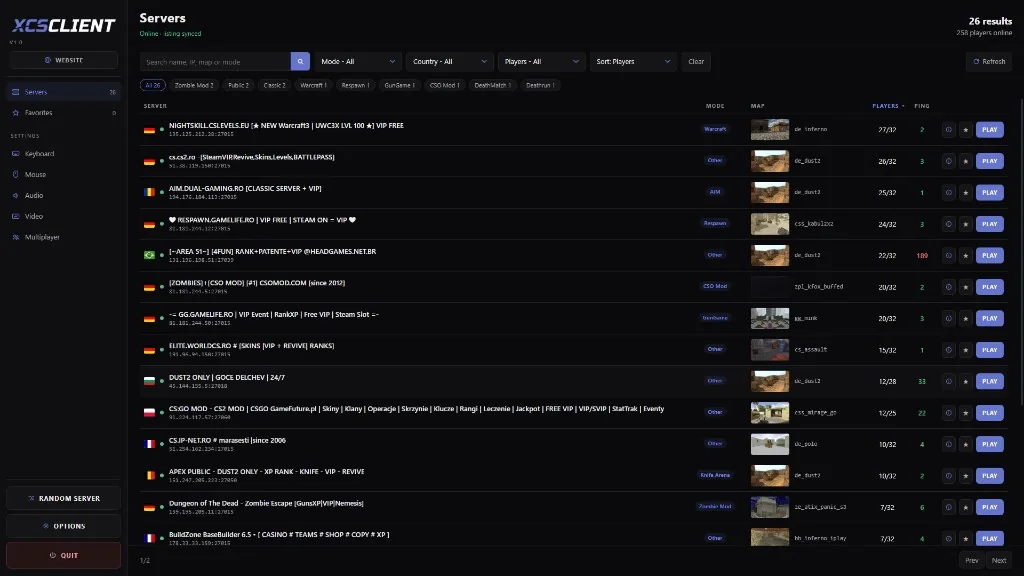
- Find a server: in Steam, View → Game Servers, or on a server list like XCSTRIKE.
- Join from the list, or type
connect IP:portin the console.
The full instructions for each step are below.
What changed in 2026#
When CS2 came out in September 2023, it replaced CS:GO under the same Steam app. On 3 March 2026, Valve released CS:GO again as a separate app with its own ID, 4465480. You can have CS:GO and CS2 installed at the same time.
| CS:GO (2026) | CS2 | |
|---|---|---|
| Official matchmaking | No | Yes |
| Community servers | Yes, the only way to play online | Yes |
| Bots offline | Yes | Yes |
| Updates | None; it's the final 2023 build | Regular |
| Steam store page | Hidden; only by direct link | Normal |
The CS:GO page is unlisted: searching the Steam store doesn't find it. Use the direct link in the next section.
Install CS:GO#
1Open the store page
Open this link in your browser or in Steam:
texthttps://store.steampowered.com/app/44654802Add it to your library
Click Add to Library. CS:GO is free.
3Install it
In your Steam library, find Counter-Strike: Global Offensive and click Install.
If the store page doesn't open, press Win + R, paste this and press Enter; Steam starts the install:
textsteam://launch/4465480
Turn on the console#
You need it to connect by IP.
1Open the settings
Start CS:GO and click the gear icon (Settings), then Game Settings.
2Enable the console
Set Enable Developer Console (~) to Yes.
3Open it
Press ~ (the key under Esc).
In Steam, right-click Counter-Strike: Global Offensive → Properties, and in Launch options add -console. The console then opens every time the game starts.
Find a server#
In Steam's server browser#
The Community Server Browser inside the game doesn't always list servers for this version. Steam's own server browser works better:
1Open it
In Steam, click View → Game Servers. You can also press Shift + Tab in game and click the servers icon.
2Show CS:GO servers
Open the Internet tab. In the filters, pick Counter-Strike: Global Offensive as the game.
3Pick a server
Sort by Latency (ping) and tick Has users playing. Double-click a server to join, or right-click → Add server to favorites.
If the list is empty, close Steam completely, start it again and refresh.
On XCSTRIKE#
The XCSTRIKE server list shows CS:GO servers with players online right now, with the IP to copy:
Live CS:GO serversBrowse servers with players online right now, by map, mode and country.Browse servers
Connect by IP#
Open the console with ~ and type connect, a space, then the IP and port:
connect 123.45.67.89:27015| Command | What it does |
|---|---|
connect IP:port | Join a server |
retry | Join the last server again |
disconnect | Leave the server |
password "pass" | Set the password for a private server, then connect |
status | Show the server, map and players |
What doesn't work anymore#
- Competitive, Wingman, Casual from the main menu only start games against bots.
- Ranks don't change: there's no matchmaking to rank you.
- Valve servers are gone for good; every online match is on a community server.
Common problems#
The server list is empty#
Use Steam's browser (View → Game Servers), not the one inside the game, and make sure the filter is set to Counter-Strike: Global Offensive. If it's still empty, restart Steam. You can always join with connect IP:port.
I can't join a server I found#
Some servers only accept players from the CS2 csgo_legacy beta instead of the standalone CS:GO, or the other way round. A server can serve only one of the two. If it doesn't let you in, try another server.
Stuck on "Connecting" or kicked right away#
The server isn't set up for the 2026 standalone version (it needs a small plugin for that). It's a server problem, not yours: pick another one.
The console doesn't open#
Turn it on in Settings → Game Settings, or add -console to the launch options.
FAQ#
Is CS:GO free in 2026?#
Yes. The standalone CS:GO is free to add to your library from its Steam page.
Can you play CS:GO online in 2026?#
Yes, but only on community servers. Valve's official servers and matchmaking are shut down.
Why can't I find CS:GO in the Steam store?#
The page is unlisted, so search doesn't show it. Open store.steampowered.com/app/4465480 directly.
Can I play CS:GO and CS2 at the same time?#
They're separate apps, so you can have both installed. Play one at a time.
Can I host my own CS:GO server?#
Yes. It takes a few extra steps for the 2026 version:
How to Make a CS:GO Server in 2026 (Standalone App 4465480)Host a CS:GO dedicated server for the 2026 standalone version: SteamCMD app 740, the 4465480 App ID fix, GSLT, ports, server.cfg and start scripts.Read the guide