CS 1.6
How to Play CS 1.6 Online in 2026
Play Counter-Strike 1.6 online in 2026: get the game, find a good server, connect by IP, the best network settings and fixes for common errors.
In this guide 10 sections
Yes, you can still play Counter-Strike 1.6 online in 2026, and thousands of people do every day. There is no matchmaking: you pick a community server and join it. This guide shows how to get the game, find a good server, connect by IP, and set up your game so it runs smoothly.
Quick steps#
- Get CS 1.6: buy Counter-Strike on Steam, or use a standalone client.
- Turn on the console: Options → Keyboard → Advanced → Enable developer console.
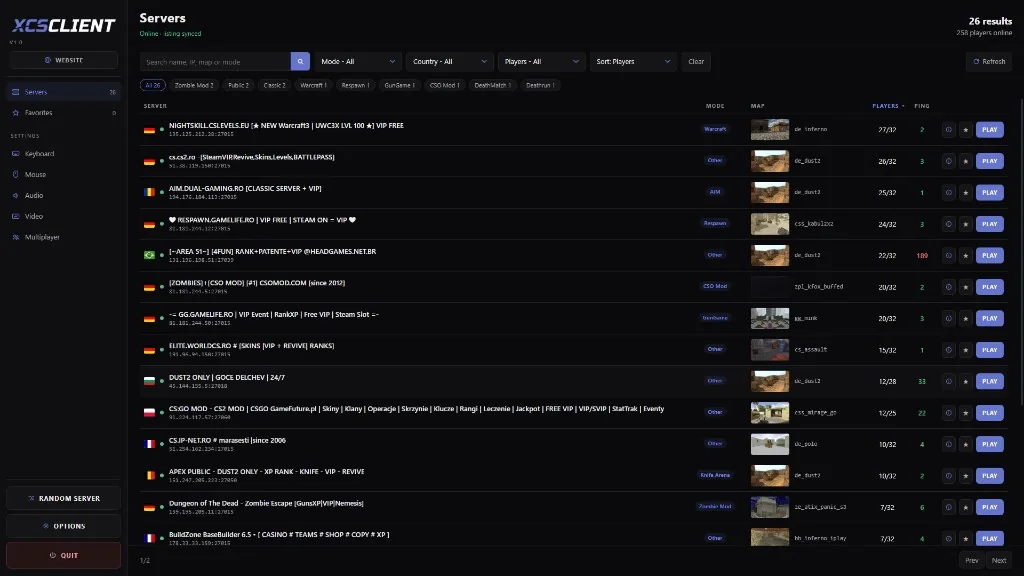
- Find a server in Find Servers → Internet, or on a server list like XCSTRIKE.
- Join from the list, or type
connect IP:portin the console. - Set your network rates once (
rate 25000,cl_updaterate 101,cl_cmdrate 101).
The full instructions for each step are below.
Get the game#
Search for Counter-Strike in the Steam store. It's the original game from 2000, updated to version 1.6. It usually costs $9.99 and often drops to $0.99 during Steam sales. Buy it, install it from your library, and start it.
With the Steam version you can join every server, because every server accepts Steam players.
You can also use a CS 1.6 client that starts on its own, without Steam. You run cstrike.exe from the game folder.
A non-Steam client can only join servers that allow it (they run a plugin called Reunion). Most community servers in Romania and Eastern Europe do, but some only accept Steam.
Turn on the console#
You need the console to connect by IP and to change settings.
1Open the options
In the main menu, click Options, then the Keyboard tab.
2Enable it
Click Advanced…, tick Enable developer console (~), then OK and Apply.
3Open it in game
Press ~ (the key under Esc) to open or close the console.
On some keyboard layouts the console key is different. In Steam, right-click Counter-Strike → Properties, and in Launch options add -console. The console then opens every time the game starts.
Find a server#
CS 1.6 has thousands of community servers: classic 5v5 maps, deathmatch, zombie, jailbreak, surf, fun maps like fy_pool_day, and many more.
In the game#
Click Find Servers in the main menu and open the Internet tab. To find a good server faster:
- Sort by Latency (ping). Under 60 is good, under 30 is excellent.
- Click Change filters and tick Has users playing and Server not full.
- Type a map name (for example
de_dust2) in the Map filter. - Liked a server? Right-click it and choose Add server to favorites. It's then in the Favorites tab.
On XCSTRIKE#
The XCSTRIKE server list shows CS 1.6 servers with players online right now, by map, mode and country:
Live CS 1.6 serversBrowse servers with players online right now, by map, mode and country.Browse servers
Every server page shows the IP to copy, the current map and the players.
Connect by IP#
If you have a server's IP (from a list, a friend or a Discord), open the console and type connect, a space, then the IP and port:
connect 123.45.67.89:27015Press Enter and the game joins the server. Useful commands:
| Command | What it does |
|---|---|
connect IP:port | Join a server |
retry | Join the last server again (for example after a timeout) |
disconnect | Leave the server |
password "pass" | Set the password for a private server, then connect |
status | Show the server name, IP, map and players (with SteamIDs) |
27015 is the usual port. If a server uses another one (27016, 27017…), it's always shown after the : in the IP. If there's no port, the game uses 27015.
Set up your game#
Good network settings matter more than graphics in CS 1.6. These values work on almost every server and connection.
1Open your config file
Go to your game folder and open (or create) this file with Notepad:
cstrike/autoexec.cfgWith Steam, the game folder is usually
C:\Program Files (x86)\Steam\steamapps\common\Half-Life.2Paste the settings
cstrike/autoexec.cfgcfg// Network rate 25000 cl_updaterate 101 cl_cmdrate 101 ex_interp 0.01 // Download missing maps and sounds from servers cl_allowdownload 1 // Frame limit fps_max 100 // Shows ping, loss and choke at the bottom right net_graph 33Start the game
The file runs every time CS 1.6 starts. Check the values in game with
net_graph 3.
What do these settings mean?
rate: how much data per second you accept from the server.25000is enough for CS 1.6.cl_updaterate: how many updates per second you want from the server (most good servers give up to 100).cl_cmdrate: how many updates per second you send. It works best when your FPS stays at or above it.ex_interp 0.01: how far back the game smooths movement.0.01matches 100 updates per second.net_graph 3: shows your FPS, ping, loss and choke. Both should stay at 0. If you see choke, lowercl_updaterate(for example to 60); if you see loss, your connection drops packets.
The server has the last word: it caps your rates to its own limits.
Play with friends#
All join the same server: one of you shares the IP in a chat and everyone uses connect. To play on a server that's only yours (your maps, your rules, your admins), you can make one; it's free:
Common connection errors#
Connection timed out / "Retrying"#
The server is offline, or the IP or port is wrong. Check the IP, then try retry. If only this one server does it, the server has a problem.
"Server is full"#
All slots are taken. Add the server to favorites and try again later, or pick another one with the Server not full filter.
"STEAM validation rejected"#
Steam couldn't check your account (Steam is the problem here, not the server). Restart Steam and the game. If it happens on every server, check that Steam shows you as online.
The download is stuck, or "Missing map"#
The server sends you a map you don't have. Check that cl_allowdownload 1 is set, and wait: some servers send files slowly. If it never finishes, the server can't send it; leave and try later.
"You have been banned from this server"#
The server's admins banned you or your IP. Only they can lift it, usually on the server's forum or Discord.
Kicked for a cheat scan#
Some servers ask players to run a cheat scanner and share the report before they can play. XCSTRIKE has a free one:
CheatDetectorScan a player for cheats and get a public report.OpenFAQ#
Is CS 1.6 still played in 2026?#
Yes. It still has thousands of active community servers, and Romania, Turkey, Brazil and Russia have some of the biggest communities.
Is CS 1.6 free?#
The Steam version isn't free, but it's cheap and often on sale. Running your own server is free.
What is a good ping in CS 1.6?#
Under 60 ms plays well; under 30 ms is excellent. Pick servers in or near your country for the lowest ping.
Why can't I join some servers?#
The usual reasons: the server is full or offline, it needs a password, you're banned, or it only accepts Steam players and you use a non-Steam client.
Next steps#
- Find a server to play on in the server list
- Want your own? Start with server guides